
Python Beginner's Guide: Installation and First Program

How to Install Python
Most modern PCs and Macs come with Python pre-installed, but if you’re unsure, you can easily check by following these steps:
Read more about What is Python.
For Windows:
- Open the Command Prompt (cmd.exe).
- Type the following command and press Enter:
This will show you the Python version installed on your system.C:\Users\Your Name>python --version
For macOS or Linux:
- Open the Terminal.
- Type this command and hit Enter:
$ python --version
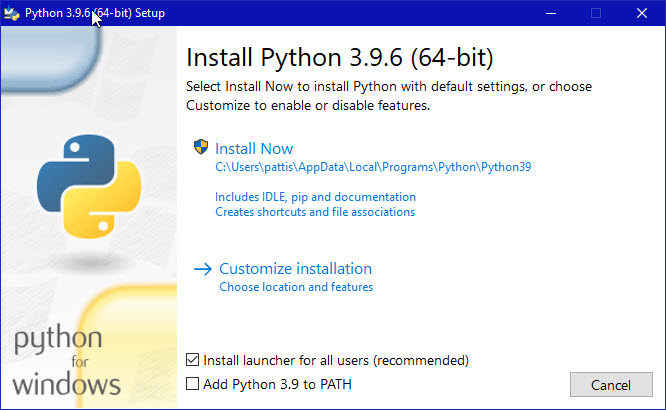
If Python is not installed on your computer, don't worry! You can download it for free from the official website: Python.org.
OR
Download it from our official Website : Click Here to Download
During the installation, make sure to add PIP to path and install it with admin priveleges.
Python Quickstart: Your First Program
Python is an interpreted language, meaning you write Python code in a text file (with a .py extension), and then execute it through the Python interpreter.
Here’s how to run your Python file:
- Open the Command Prompt (Windows) or Terminal (macOS/Linux).
- Navigate to the folder where your Python file is saved.
- Type the following command:
C:\Users\Your Name>python helloworld.py
Let’s write a simple Python program, Hello, World!, in a new file called helloworld.py. You can use any text editor (like Notepad, Sublime Text, or Visual Studio Code) to create this file.
Example: Hello, World! Program
- Open your text editor and type the following Python code:
- helloworld.py
print("Hello, World!") - Save the file as
helloworld.py.
Running Your First Python Program
Now, go back to your Command Prompt or Terminal. Navigate to the folder where you saved helloworld.py. Then run:
C:\Users\Your Name>python helloworld.py
You should see the following output:
Hello, World!
Congratulations!
You’ve just written and executed your very first Python program. You're officially on your way to mastering Python programming. Keep practicing and exploring more Python features!


.png)

.jpg)

0 Comments